




Play Block Pixels Online for Free
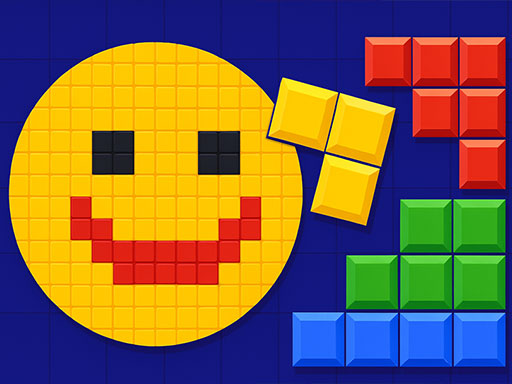
In this game, you drag colorful blocks onto an 8x8 grid to complete and clear lines from the board. Clearing specific colored blocks also helps reveal hidden pixel art images as you progress.
You can play Block Pixels directly in your browser on Skiioo without downloading anything. Mobile support is listed for iOS and Android browsers, but performance can vary depending on your device and browser.
About Block Pixels
Block Pixels combines block-clearing puzzle rules with pixel art discovery. You place pieces on the grid, clear horizontal or vertical lines, and work toward revealing hidden images by clearing the required colors.
The game is a good fit for players who enjoy casual games with simple controls and planning-based board layouts. It also connects naturally with puzzle games and block games because the main challenge is choosing where each block should go.
How to Play Block Pixels
Your goal is to place blocks on the 8x8 grid, clear lines, and reveal hidden pixel art images by clearing the needed colors.
- Drag blocks onto the grid using mouse or touch input.
- Complete full horizontal or vertical lines to clear them.
- Clear the colors needed for the current pixel art image when possible.
- Keep enough open space on the board for upcoming blocks.
- Additional controls or instructions may appear inside the game interface.
Block Pixels Gameplay
The gameplay focuses on placing blocks carefully so the board does not fill too quickly. Each move matters because a poor placement can leave gaps that are difficult to clear later.
Clearing lines helps you continue playing, while clearing specific colors contributes to the hidden pixel image. The game data also mentions combo bonuses for clearing multiple lines at once.
Features
Block Pixels focuses on block placement, line clearing, and hidden pixel art images.
- 8x8 grid-based block puzzle gameplay.
- Horizontal and vertical line clearing.
- Hidden pixel art images revealed through colored block clearing.
- Combo bonuses listed for clearing multiple lines at once.
- Mobile support listed for iOS and Android browsers.
Tips and Tricks
- Place larger block shapes carefully so they do not block future moves.
- Try to keep open space in different parts of the grid.
- Clear full lines whenever they help prevent the board from filling up.
- Watch which colors are needed for the current pixel art image.
- Look for chances to clear more than one line with a single placement.
Troubleshooting
If Block Pixels does not load, try these quick fixes:
- Refresh the page and restart the game.
- Check your internet connection.
- Disable browser extensions that may block embedded games.
- Update your browser.
- Try another browser or device.
Game Details
- Runs in the browser with an internet connection required.
- Category: Casual games
- Provider metadata lists the developer as Bofer Media (Twim Studio).
- Mobile support is listed for iOS and Android browsers, but performance can vary by device and browser.
- Controls: Drag colorful blocks onto the grid using mouse or touch input; additional controls may appear in-game.
FAQ
Is Block Pixels free to play?
Yes, you can play Block Pixels for free directly in your browser on Skiioo.
Do I need to download anything to play?
No downloads are required. The game runs online in the browser.
What is the main objective of Block Pixels?
The main objective is to place blocks on the 8x8 grid, clear lines, and reveal hidden pixel art images by clearing specific colors.
How do I control the blocks?
You drag blocks onto the grid using mouse or touch input. Additional controls may appear inside the game interface.
What are combo bonuses in Block Pixels?
The game data mentions combo bonuses for clearing multiple lines at once.
Comments
No comments yet. Be the first to comment.